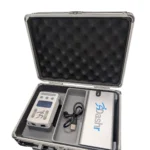
The jump data you need, the way you need it on the device and in app.
Measure:
- Counter Movement Jumps (CMJ)
- RSI
- Depth Jumps and Plyo Jumps
- Just Jump conversion for data continuity
- Data presented in inches or centimeters
- Store athlete data with Dashr Roster Spots or Player Profile
- No app required, LED screen shows results
| Weight | 2.6 lbs |
|---|---|
| Dimensions | 9 × 8 × 3.5 in |
1 year warranty
1 Laser Jump Device
1 USB battery bank
1 Charging USB-A to USB-C cable
1. Download our App
Install the Dashr App by searching for it in the Google Play store or Apple App Store.
NOTE: Operation of the system requires that your phone has Bluetooth® turned on to connect to Dashr equipment. Connection takes place in the App, not your phones’ settings.
2. Install/Open App
Make sure that your phone/tablet is properly charged before using the Dashr system. Open the Dashr App on your mobile device and log into your Dashr account. If you do not have an account, you can make one at dashboard.dashrsystems.com. On the Dashboard you can create rosters, add athletes, create leaderboards, and connect with athletes to share their results with the Dashr Player Profile app.
3. Register your devices
All Dashr products (besides 2.0 and RFID modules) need to be registered with EACH phone or tablet you are using. To do this, select “Device Registration” from the main page (or the + button at the top left) and POWER ON YOUR DASHR DEVICES ONE AT A TIME TO REGISTER THEM.
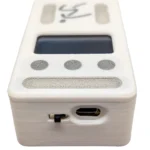
Each Vert device comes with a rechargeable USB battery bank. The USB-A to USB-C cable included can be used to power the Vert device from the battery if extended battery life is needed. This cable is also used to charge the Vert or the battery when not in use. Now that you have the device on, select it from the “Available Devices” list and assign it ANY NUMBER you want.
There is a spot on the bottom of the Vert device where you can label your device with that number. Repeat this for each device. Note that this only needs to be done the first time a phone/tablet is using the Dashr device(s).
4. Place your Vert
When performing the vertical jump or RSI you want to jump off a solid surface. Do not use on grass, turf, or gravel. Identify a flat space that is at least 3x3ft and clear of any objects. Power on the device.
5. Select the drill in the app
When logged into the app, the main page of the app provides several options to select your desired drill – either vertical jump or RSI. Once selected, each drill will present more information. You will select “Vert Device”, as you are using the Dashr Vert, to begin configuring devices for your drill. With the Jump module on, select the number you assigned it (in registration) from the drop-down menu and press the “Connect” button. If it does not work the first time, repeat. Once all devices are connected, press the “Start Testing” button. If you have any questions throughout the process, help and tips have been built into the app at each stage in addition to further support on the website. www.dashrsystems.com/drills
6. Test your athletes
The Vert device will take a couple seconds to calibrate and then it will say “Ready” with the back light blue and the front lights green. Check in the appropriate athlete by selecting them from the menu at the top right. Have the athlete step into the laser, about 2.5 ft away from the front of the Vert device (see image above). The front lights will go red. Press the “Set” button in the app and instruct the athlete to do a vertical jump. Make sure that the athlete does not tuck their legs during the jump to cheat the system by getting more hang time. Treat this system like you would a jump mat. You can toggle units from in. to cm. by pressing the middle button on the Vert device. Have the athlete leave the laser window, press “Save” then press the “Reset” button. Allow the Vert device to recalibrate and check-in the next athlete.
Dashr Vert FAQs
What jump metrics does Dashr Vert measure?
Vertical jump, ground contact time, counter movement jump.
How big is Dashr Vert?
The unit is 3.5″ x 2″ x 1.125″. Shipping size with case and battery is 9″ x 8″ x 3.5″.
Does Dashr Vert store data?
Yes. With the Dashr Roster or Player Profile, data can be stored for each athlete, providing the information needed to improve athlete jump heights.
Does Dashr Vert have a Just Jump conversion?
Yes. This conversion allows for data continuity with the Just Jump Mat.
Does Dashr Vert show data in inches and centimeters?
Yes, either unit of measurement inches or centimeters can be selected.
What is the Dashr Vert battery life?
2-3 hours without the Dashr Plug in auxiliary battery, 48 hours with included auxiliary battery.
Need help finding the right tool for you?
Call, text us 925-461-5990 or email us for assistance
Fill out the form below, and one of our experts will reach out to you shortly.
Dashr Vert
$350.00
 Earn
1,750
pts
Earn
1,750
pts
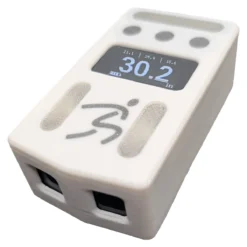
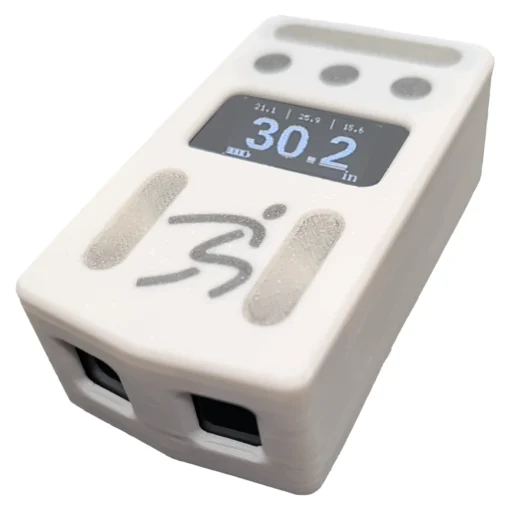
Ideal for individual athletes, trainers and large teams, the Dashr Vert provides the vertical jump data in a device that fits in your pocket!
Measure vertical jump height, RSI, depth, plyo jump and Counter Movement Jumps (CMJ) with the pocket sized Dashr Vert. The size of a deck of cards allows you take jump testing from the weight room to court, field, or track with ease. Data is displayed on the LED screen and can also be integrated into the Dashr App.
Athletes benefit from the motivation of immediate feedback, coaches benefit from having the have the data needed to track jump progress over time to see improvement, plateaus, and customize training to drive results.
Details
The jump data you need, the way you need it on the device and in app.
Measure:
- Counter Movement Jumps (CMJ)
- RSI
- Depth Jumps and Plyo Jumps
- Just Jump conversion for data continuity
- Data presented in inches or centimeters
- Store athlete data with Dashr Roster Spots or Player Profile
- No app required, LED screen shows results
Shipping
| Weight | 2.6 lbs |
|---|---|
| Dimensions | 9 × 8 × 3.5 in |
Warranty
1 year warranty
What's Included
1 Laser Jump Device
1 USB battery bank
1 Charging USB-A to USB-C cable
Video
FAQs
Dashr Vert FAQs
What jump metrics does Dashr Vert measure?
Vertical jump, ground contact time, counter movement jump.
How big is Dashr Vert?
The unit is 3.5″ x 2″ x 1.125″. Shipping size with case and battery is 9″ x 8″ x 3.5″.
Does Dashr Vert store data?
Yes. With the Dashr Roster or Player Profile, data can be stored for each athlete, providing the information needed to improve athlete jump heights.
Does Dashr Vert have a Just Jump conversion?
Yes. This conversion allows for data continuity with the Just Jump Mat.
Does Dashr Vert show data in inches and centimeters?
Yes, either unit of measurement inches or centimeters can be selected.
What is the Dashr Vert battery life?
2-3 hours without the Dashr Plug in auxiliary battery, 48 hours with included auxiliary battery.
Need Help?
Not sure what you need?
Call, text us 925-461-5990 or email us for assistance
Fill out the form below, and one of our experts will reach out to you shortly.